
October updates: Combined supervision feeds and WhatsApp reminders for microplans

It's been a few months since our last update about new features in the Crosscut App, and we have a few exciting updates and features to share. Several of these updates focus on bringing data from more than one tool, and messages through more than one channel, into the same planning workflow in the Crosscut App.
CommCare and KoboCollect sites in one supervision feed
Program managers can use a real-time supervision link in the Crosscut App to track campaign progress. The customized link opens a map showing where supervisors have visited, which gets updated each morning from the field data teams collect. In July we added KoboCollect as a third data source, alongside CommCare and ODK.
Implementing partners often collect data with more than one tool in the same campaign, and teams being able to work with all of them in one place is a constant focus of ours. A supervision map built from one source misses every site reported through the other tools. The three maps below use sample data for the same area. The first two each show data from only one tool, and both suggest gaps in supervision coverage. The third map combines both tools and shows that the other tool’s sites cover most of those gaps. Supervisors working from a single-source map may send teams back to places another team already visited.
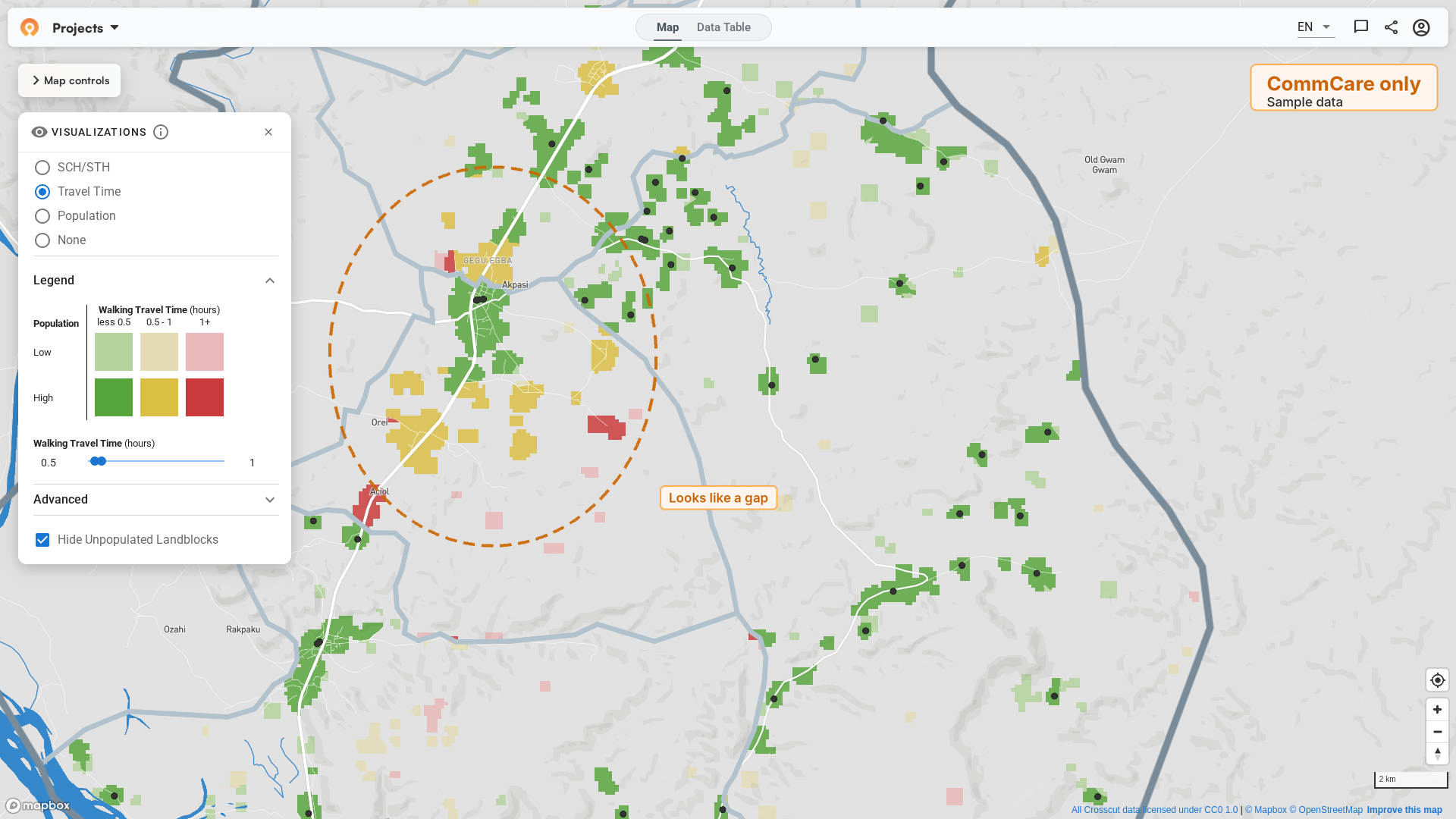
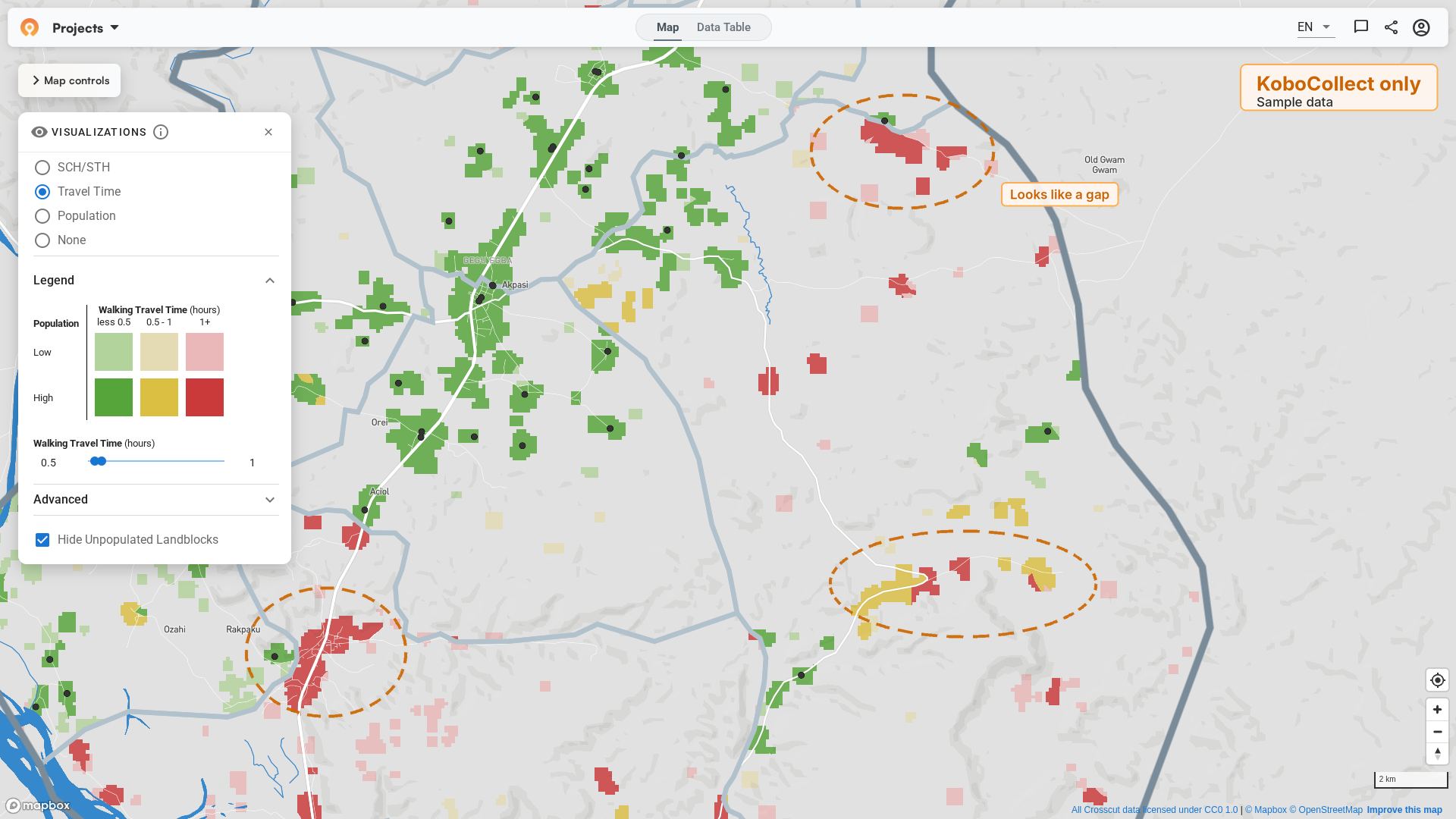
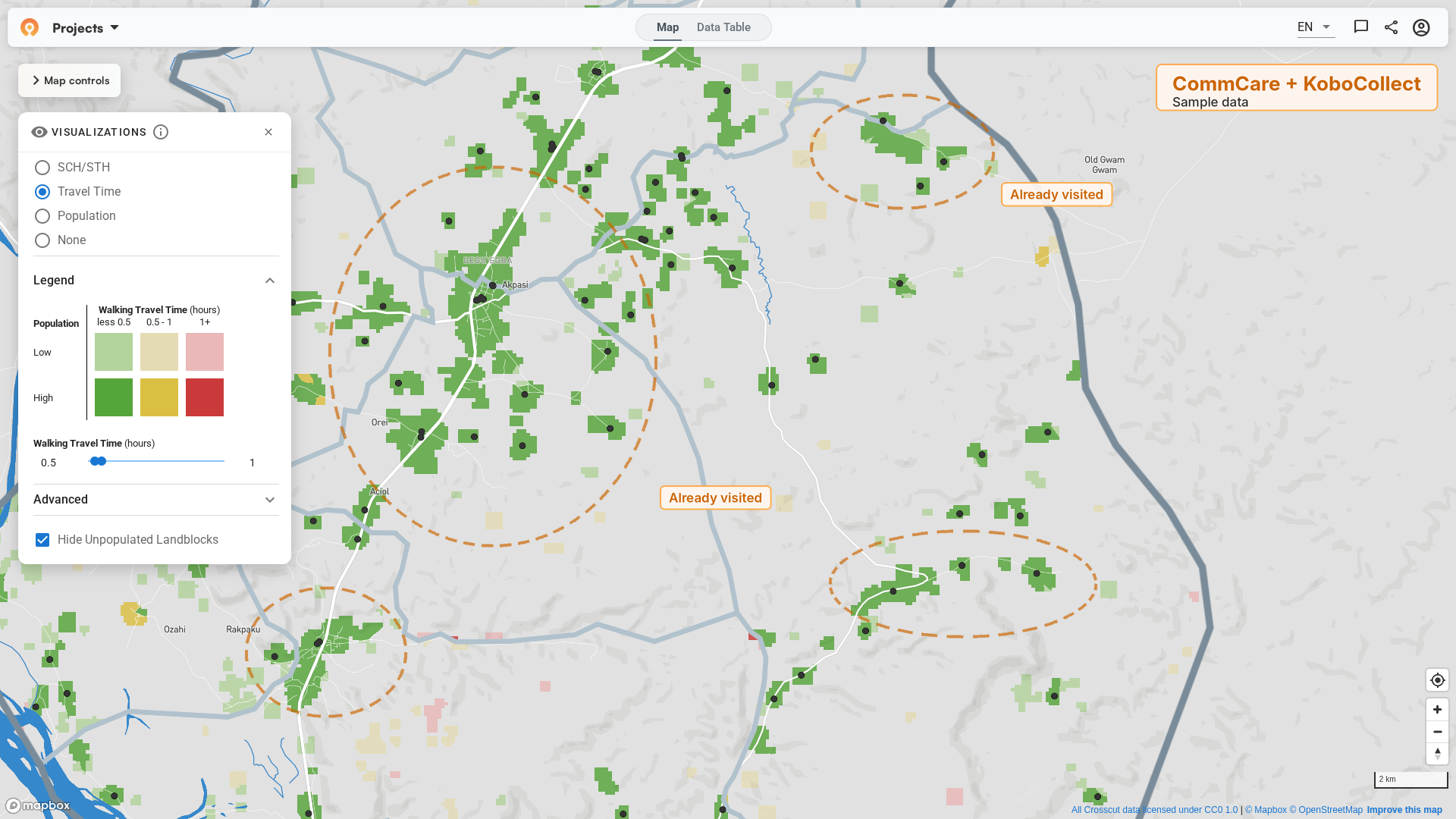
We first combined CommCare and KoboCollect sites on one daily supervision link for a campaign in Benue State, Nigeria. This summer, we set up the same combined link for campaigns in two more Nigerian states, Kogi and Osun. These were MDA campaigns that delivered deworming medicine for two parasitic worm infections. Soil-transmitted helminths (STH) spread through contaminated soil, and schistosomiasis spreads through contact with fresh water where infected snails live. In all three states, supervisors now see every site teams have reached on one map, whichever tool recorded the visit. Our Nigeria work covers more on how these state campaigns use the Crosscut App.
UNICEF and Gavi’s review of real-time campaign monitoring recommends keeping the number of platforms and the amount of manual data processing to a minimum. Combining both sources into one link means supervisors check one map instead of two.
Get WhatsApp notifications from the Microplan Collector
The Microplan Collector is the part of the Crosscut App that emails microplan templates to district and facility contacts and collects the completed plans. In many of the countries we work in, district and facility staff check WhatsApp far more often than email. Template emails can go unnoticed for days, which delays the microplans campaigns depend on.
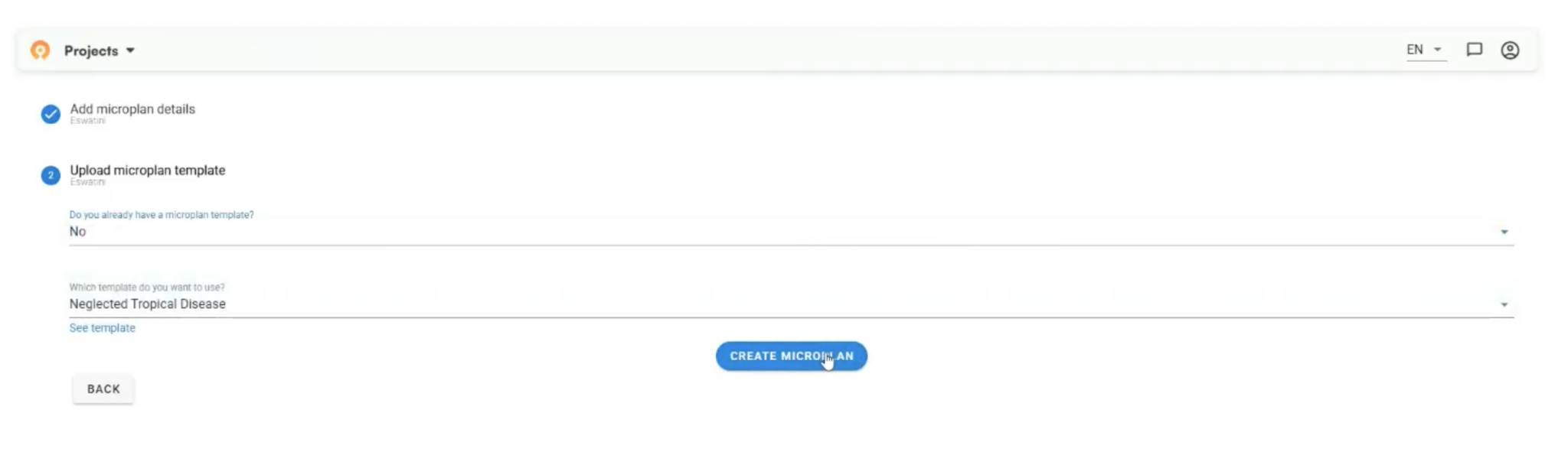
A program manager can now turn on WhatsApp notifications when creating a collection job. Here's a general workflow for how the notifications work:
- Contact lists gain WhatsApp columns. The job's contact list adds WhatsApp number columns and flags any numbers in the wrong format.
- Messages follow confirmed emails. When an email to a contact is confirmed delivered, the contact also gets a short WhatsApp message telling them to check their email.
- Managers review before sending. The send window shows the message text, lists who will be notified, and warns about invalid numbers.
- Contacts control their messages. Contacts can reply STOP to stop receiving messages, or START to receive them again. The Crosscut App skips opted-out numbers on every job.
UNICEF and Gavi’s report found that Pakistan’s campaign staff relied on WhatsApp groups to report coverage, because official data took too long to reach field teams. The Microplan Collector’s WhatsApp messages reach district and facility contacts on the same platform and point them to the template email, so completed microplans come back sooner.
More reliable catchment area generation
We also fixed three problems in the engine that the Crosscut App uses to assign land areas to health facilities or distribution sites:
- Catchments inside a larger boundary. Programs often plan with catchments that stay inside a larger parent area, such as a district or a supervisor’s zone, usually because supervision and funding follow those lines. Small leftover slivers of land at the edge of a parent area could get attached to a site on the wrong side of the boundary, and the whole job would fail with an error. Crosscut now attaches these slivers only to sites within the same parent area, so no household ends up assigned across a boundary it shouldn’t cross. These nested catchment jobs now finish instead of stopping on an error.
- Large data downloads. When the Crosscut App downloaded many data files at once from cloud storage, the underlying operation could hit rate limits and fail partway through. The engine that assigns land now retries failed downloads automatically, waiting a little longer each time, and limits how many files it downloads at once.
- Older boundary sets. Site-based catchment jobs, one of the mapping methods in the Crosscut App, failed on some older boundary sets that don't include administrative ID codes, which we saw happen with some older Bangladesh boundaries. Crosscut now handles these boundaries the right way, so countries with older boundary data can use site-based catchments again without error messages.
The big benefit here for users is that large multi-district jobs are now much less likely to fail for temporary technical reasons, so staff don't have to re-run them or lose time.
Faster maps and account emails from Crosscut
The last two updates cover elements like map loading and account access:
- Faster, lighter maps. Many of our users work on low-bandwidth connections or older laptops in the field. We removed duplicate values from the map data sent to users' browsers. For a typical detailed map section, the browser now processes about 42% less data, and the download is about 10% smaller. Maps load faster and are less likely to freeze or crash, especially in dense areas with many land blocks. A planned follow-up should cut download sizes roughly in half.
- Account emails from a Crosscut address. Sign-up verification codes and password-reset emails now come from Crosscut <no-reply@app.crosscut.io> instead of a generic Amazon address. When we did a recent review of this workflow, a password-reset email from the old sender went to spam, and any user who can't find the code can't sign up or get back into their account. The emails go out in English for now, with French and Portuguese in the pipeline.
What's next for the Crosscut App
Since WHO published its campaign integration guide it’s been a topic of frequent discussion online. WHO is clear that health programs should aim to share data, tools, and monitoring instead of running parallel systems. In other words, there’s a lot of momentum building around answering the question of how to get malaria, NTD, and immunization teams working from the same maps and population data.
The same question came up while I was working with teams in Nigeria, and Coite heard it from program managers in Oslo, Lilongwe, and Brazzaville over the past two years. That’s why so much of our focus has gone into connecting with systems programs already use, from DHIS2 to CommCare and KoboCollect.
All of these updates are live in the Crosscut App, which is free to use. If your program wants a combined supervision feed or WhatsApp notifications set up for an upcoming campaign, reach out through our advisory services.
Frequently asked questions
Can the Crosscut App combine CommCare and KoboCollect data on one supervision map?
Yes. The Crosscut App can pull field data from CommCare and KoboCollect into the same daily supervision link, so supervisors see every site teams have reached on one map. We first set this up for a campaign in Benue State, Nigeria. We've since used it for deworming campaigns in Kogi and Osun states that treated soil-transmitted helminths and schistosomiasis.
Which field data collection tools work with the Crosscut App?
The Crosscut App works with CommCare and ODK, and with KoboCollect (also called KoboToolbox). It pulls the latest supervision visits from these tools once a day and rebuilds the supervision map at the same link. Program managers open that link each morning to see where supervisors have been, and nobody has to upload files by hand.
Why can a supervision map built from one data source show false gaps?
Many campaigns collect field data with more than one tool. A map built from only one of those tools leaves out every site reported through the others. Those areas look unvisited even when teams already covered them, so supervisors may send teams back to places another team already visited. A combined map shows true supervision coverage across all tools.
How do WhatsApp notifications work in the Microplan Collector?
The Microplan Collector emails microplan templates to district and facility contacts and collects the completed plans. When a program manager turns on WhatsApp notifications, each contact whose email is confirmed delivered also gets a short WhatsApp message telling them to check their email. Messages go out in French for now. Contacts can reply STOP to opt out or START to opt back in.
Does the Crosscut App work on slow internet connections?
The Crosscut App is built for teams on low-bandwidth connections and older laptops. A recent update means the browser processes about 42% less data for a typical detailed map section, and the download is about 10% smaller. Maps load faster and are less likely to freeze in dense areas.
Is the Crosscut App free to use?
Yes. Anyone can use the Crosscut App for free to create catchment area maps, track supervision coverage, and collect microplans. Programs that want help setting up a combined supervision feed or WhatsApp notifications for a campaign can work with Crosscut's advisory services team.
Related Posts
What WHO's new campaign integration guide says about shared maps and data


What UNICEF and Gavi learned about real-time campaign monitoring for health campaigns
What are never treated communities, and how does WHO’s new toolkit help NTD programs find them?
